Logging and analysis of compressed air flows is essential for good management. MeterGrapher provides a simple, flexible, cost-effective solution on your PC.
Latest version available – 2.32. See MeterGrapherReadMe for details and box below right for a summary.
System requirements – Modern PC with spare USB port and/or Ethernet connection to a router.
With MeterGrapher you can:
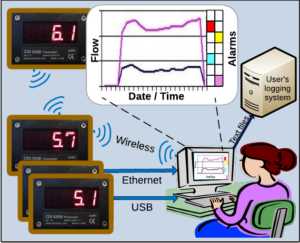
- Link up to 250 meters to your PC using ZigBee wireless, COM/USB or Ethernet adapters.
- Log CDI flow and pressure meters, and optionally any other devices that use the Modbus protocol
- Describe the meter configuration, including lower and upper limits.
- Log values at any interval down to 200ms per meter.
- Monitor meter status (Values in limits or out of limits, no limits set, no data from meter)
- Retain historical values
- Use powerful built-in graphing capabilities for analysis and decision support
- Export data to other logging systems
- Auto-start logging on PC restart
- Renumber CDI meters
- Use pre-formatted Excel workbooks for further data analysis
- Adjust parity and stop bits to match system settings
Please look at the MG Documents.
MeterGrapher is feature-rich and you will get the best out of it if you know what it can do!
N.B. Re-installing will overwrite AnswerGrapher.xlsm and MGUsageCalcs.xlsm – please save these with new names if you have data in them.
MeterGrapher version 2.32 release
- Removal of SMS Messaging. Many countries (including USA) are changing their regulations and CDI's scheme is no longer acceptable.
- New MGUsageCalcs.xlsm
- User Files Directory on Main Form: Double-click to open the Directory in File Explorer.
- Positions of main windows stored for next session.
For the full release history see MeterGrapherReadMe
If you wish to log non-CDI devices contact CDI Meters Inc.
If you are using V2.24 or later this update is fully backward-compatible.
Otherwise please contact CDI before installing this update.